Hardware
Use the tablets you have, or we send the whole counter.
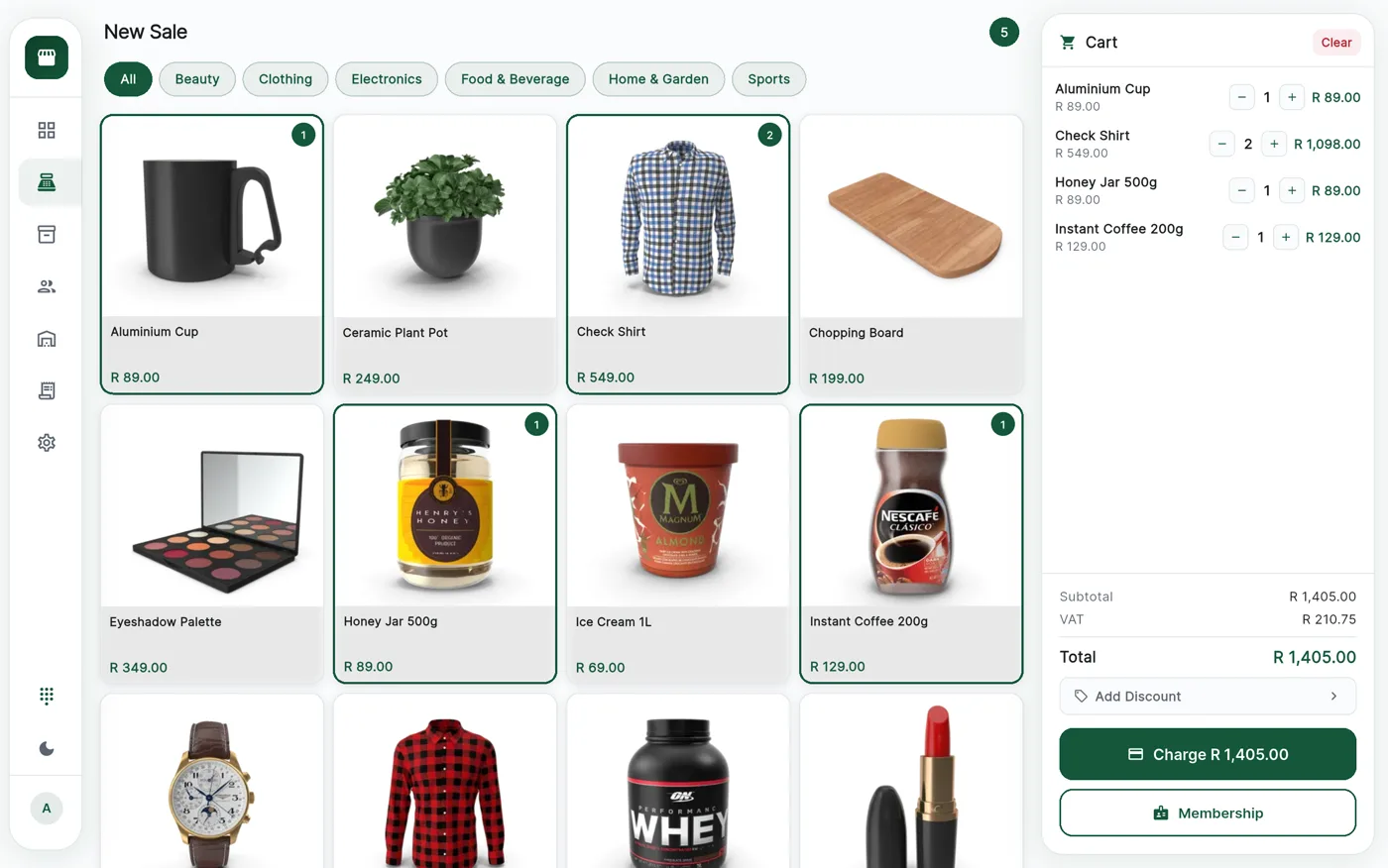
The CannyPos till is an Android app. If there are already tablets in your shop, put the till on them. If you would rather the counter turned up working, we supply it.
- No hardware you are obliged to buy from us
- The card machine is part of the till
- Branded membership cards for your loyalty programme
Two ways in
Bring your own, or buy the lot from us.
Some till systems only run on the box they sell you, which is how a software decision quietly becomes a hardware bill. CannyPos is an Android app, so it runs on tablets you already own. What we supply is the alternative, not the requirement. Hardware is one part of it, alongside everything else CannyPos does for a cannabis shop.
Use what you already have
Install the till on your own Android tablets or phones, sign your staff in and start trading. Nothing is held back because the devices did not come from us.
Have it arrive working
Tell us how many counters and branches you are fitting out and we quote for all of it. What reaches you is a till, not a box of parts.
At the counter
What a counter actually needs
Two things make a complete working counter: a tablet for the till, and the card machine that goes with it. The till sends the total across and the customer taps, which saves a cashier typing an amount twice a hundred times a day. More in how payments work.
Everything under those two is an addition. Add them when the queue tells you to.
- Android tabletThe till. Start here
- Card machineIntegrated with the till
- Receipt printerOptional, receipts can be emailed
- Barcode scannerOptional, quicker at a busy counter
- Cash drawerOptional, for the float and the cash
- Customer displayOptional, a second screen facing the queue
- Membership cardsOptional, printed with your shop on them
The printer is a preference, not a requirement
A receipt can be printed or emailed, so a printer decides what your counter feels like rather than whether it works. The sale, the VAT and the stock movement are recorded identically either way.
Membership cards
Cards your regulars keep in their wallet.
The loyalty programme works without a card. A phone number or a name finds a member just as reliably. But a card gets handed over before the cashier has to ask, and that keeps a members club alive instead of forgotten.
We print them branded for your shop. The cashier holds the card against the device or scans it, and the member is on the sale with their tier, their benefits and their points.
- One tap to attach the member, so nobody skips it when busy.
- Tap or scan, whichever suits your counter.
- Lost the card and a phone number still finds them.
At the counter this is one tap. Here, drag it.
Before it lands
Set up before it reaches your counter.
Hardware we supply is configured as part of your business first, not handed over as a blank tablet and a password.
Registered to the right branch
Each device is tied to the store it belongs to, so its stock, its takings and its day-end land in the right place from the first sale, and separate branches stay properly apart.
Staff PINs already created
Every cashier signs in with a four-digit PIN and the role you gave them, so every void and discount has a name on it.
Your catalogue loaded
Your products, prices and categories are on the device before it gets to you. Nobody spends the first evening typing in stock.
When something goes wrong
A broken tablet is an inconvenience, not a crisis.
Sales sync to the server as they happen. Your products, prices, stock, members and reports live there, so a dropped or stolen tablet takes none of it with it. The device on your counter is a window onto your business, not the place it is kept.
Sign in on another device
Put the till on any other Android tablet or phone, sign in with the same PIN and carry on. The catalogue and stock are already there.
A dropped line is not a breakdown
If the internet fails rather than the device, the till keeps trading. Sales queue on the tablet and go up the moment the line returns.
Keep a spare under the counter
An old tablet is worth holding on to for exactly this. It costs nothing to leave one in the drawer, and it turns a bad morning into a five-minute one.
Questions
Hardware, answered plainly
Can I use Android tablets I already own?
Yes. The till is an Android app, so it runs on the tablets or phones already in your shop. There is no hardware you are obliged to buy from us.
What hardware does a counter actually need?
A tablet for the till and the card machine. That is a complete working counter. A receipt printer, a barcode scanner, a cash drawer and a customer-facing screen are all optional, and most shops add them later.
What happens if a till breaks or is stolen?
Sign in on another Android device and carry on. Sales sync to the server as they happen, so your products, stock, members and reports are not on the tablet.
What does the hardware cost?
It depends on how many counters and branches you are fitting out, so we quote per shop. See how pricing works, then tell us what your counter looks like.
Tell us what your counter looks like.
How many shops, how many tills, and what you already own. We will tell you what is worth buying and what is not.